The latest Windows 11 24H2 Patch Tuesday update is causing SSDs and HDDs to reportedly break with chances of data corruption as well.

www.neowin.net
Sayan Sen · Aug 17, 2025 08:56 EDT · Hot!
42
Last week, Microsoft released a very important
Defender update for new Windows 11 and 10 ISO image installations that deals with the widespread Lamma stealer. The security update was published right around the time of the Windows Patch Tuesdays for the month of August 2025 on Windows 10 (
KB5063709 / KB5063877 / KB5063871 / KB5063889) and Windows 11 (
KB5063878, KB5063875).
The Windows 11 24H2 KB5063878 update has not exactly been flawless as it exhibited installation issues,
throwing up a 0x80240069 error code. The company managed to resolve the issue later and has deployed a fix.
And it does not end there as apparently the update triggered storage failures that cause drives to disappear, making them and their corresponding SMART (Self-Monitoring, Analysis and Reporting Technology) unreadable by the OS, according to a new report.
The issue purportedly surfaces during heavy write operations to certain NVMe SSDs as well as HDDs, especially when continuous sustained writes approach 50 GB on drives and exceed 60 per cent controller usage. This could potentially lead to a "high likelihood of file corruption when symptoms occurs" adds the report (Translated from Japanese by Grok AI).
The report speculates that this could be due to a malfunction in the drive cache subsystem. Symptoms are said to recur predictably after a system reboot, which temporarily restores drive visibility but does not address the underlying fault. Affected users are said to be consistently experiencing failure under similar workload patterns within minutes.
Further analysis has suggested that SSDs built on Phison NAND controllers especially DRAM-less models exhibit failures at lower write volumes. Reports suggest that select enterprise-grade HDDs also display comparable symptoms under intensive writes.
The issue definitely bears high similarity to the WD SN770 host memory buffer (HMB) flaw, and in this case, too, restricting or disabling HMB yields no improvement. A suspected memory leak in Windows’ OS-buffered cache region could be the problem.
If you recall, that is something Microsoft apparently fixed back in October 2024, but when we reported again in June 2025, it was still a problem as WD/SanDisk failed to
appropriately inform users about the correct firmware patch which meant Windows 11 24H2 was still blocked.
We looked around and could not find other reports resembling such situations. The problem has been reported by a Japanese PC builder and enthusiast and some of the comments on the thread seem to indicate that others there may be experiencing similar issues. So it could be a region-specific thing too.
Source:
@Necoru_cat (X)
Update, same day: It appears that the tester also uploaded detailed test result of all the drives they tested, 21 in total across a series of steps:
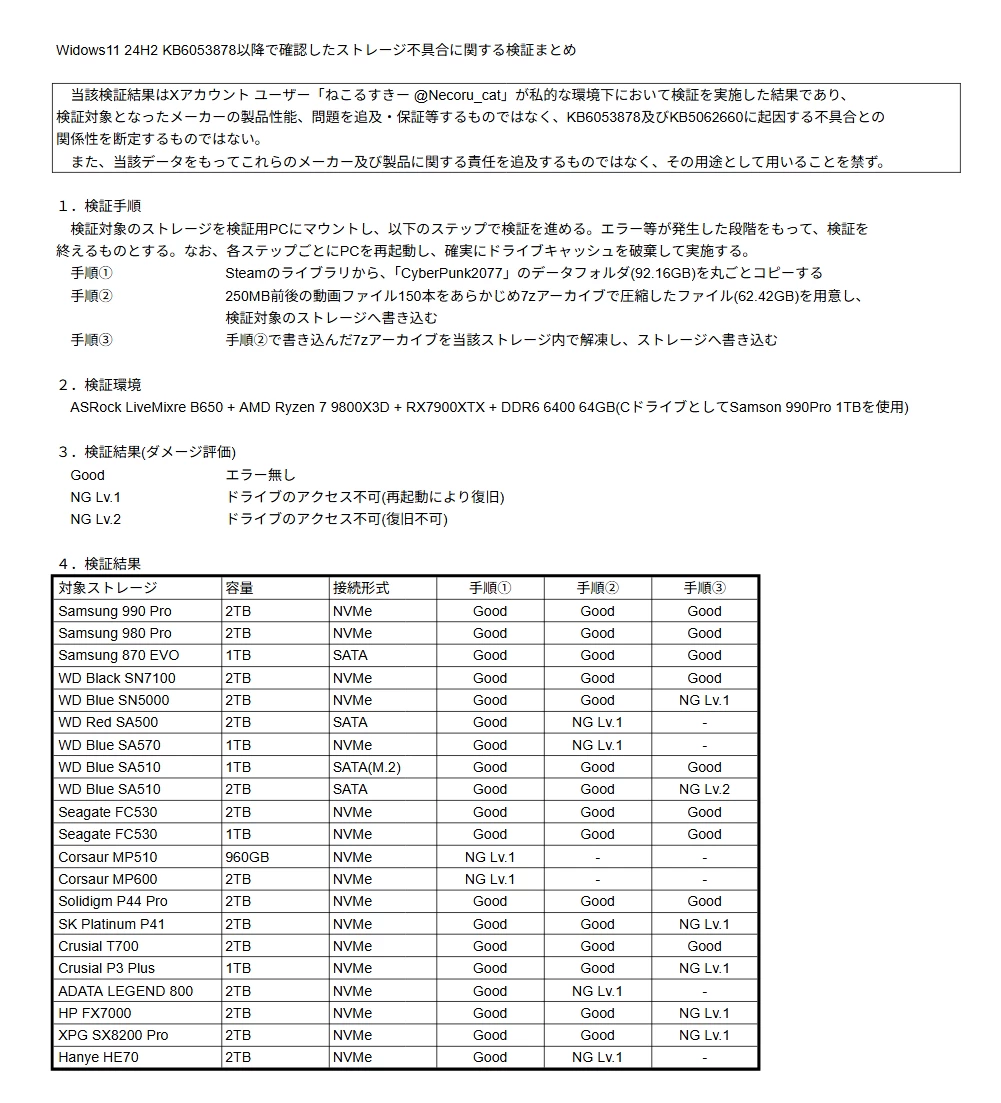
For reference,
- Good = no errors, NG Lv. 1,2 = Not Good level 1 & 2.
- NG Lv.1 = Drive inaccessible (recoverable by rebooting)
- NG Lv. 2 = Drive inaccessible (unrecoverable)
Steps:
- Restart the PC after each step to ensure the drive cache is cleared before proceeding. Copy the entire "CyberPunk2077" data folder (92.16GB) from your Steam library.
- Prepare a 62.42GB file (62.42GB) containing 150 video files, each approximately 250MB, compressed into a 7z archive. Write this to the storage device to be verified.
- Decompress the 7z archive written in Step 2 within the storage device and write it to the storage device.
Source:
@necorucat (X)




