HELP!!! My laptop has a black screen when I turn it on!!!!

Arris

Superstar
Joined
Sep 11, 2013
Messages
9,019
Reputation
2,774
Daps
33,368
Reppin
Cleveland
use a hdmi cable to see if it's completely done or if it's just an isolated screen problem.
 

MustafaSTL

Achievement In Every Field of Human Endeavor
Joined
May 1, 2012
Messages
17,956
Reputation
4,385
Daps
54,976
Did yo spill something on your laptop? That happened to me when a drink got knocked over and got into my Mac. I was pissed. You could hook it up to the tv from Apple TV and see the screen just fine. And you could shine a flashlight on the screen and see it barely. But it was pretty much done. Not sure if that's the case for you, but for me, the cost to repair was too much for how much that laptop was worth at that point.
 
Joined
Oct 22, 2017
Messages
34,408
Reputation
6,500
Daps
159,219
Reppin
Golden Era/Drama free Zone
200.gif
 

Big D Bangston

Superstar
Joined
Jun 21, 2012
Messages
13,956
Reputation
2,383
Daps
33,885
Reppin
Bama born and bred
I didnt spill anything on it or drop it, I just turned it on a few days ago and got nothing on the screen.

Its a toshiba by the way.

Had it since 09', but got important shyt on it and really dont want to lose it.
 

Coolin'

All Star
Joined
Aug 24, 2017
Messages
3,381
Reputation
335
Daps
7,603
Sounds like a faulty graphics card. You could try to troubleshoot it yourself but honestly, it’s probably time for new laptop. Same thing happened to me back in 2010 with my ASUS.

:mjcry:
 

Methodical

Veteran
Supporter
Joined
Jun 16, 2012
Messages
56,696
Reputation
7,446
Daps
129,184
Reppin
NULL
@Big D Bangston

Maybe, your laptop's motherboard is dead/fried so you better go to computer repair if you have a warrant so can replace motherboard for free
 

Arris

Superstar
Joined
Sep 11, 2013
Messages
9,019
Reputation
2,774
Daps
33,368
Reppin
Cleveland
I didnt spill anything on it or drop it, I just turned it on a few days ago and got nothing on the screen.

Its a toshiba by the way.

Had it since 09', but got important shyt on it and really dont want to lose it.
that boy gave out :francis:

get the hard drive to a store and have them transfer all that stuff to another one
 
Joined
Dec 27, 2017
Messages
3,899
Reputation
1,672
Daps
12,276
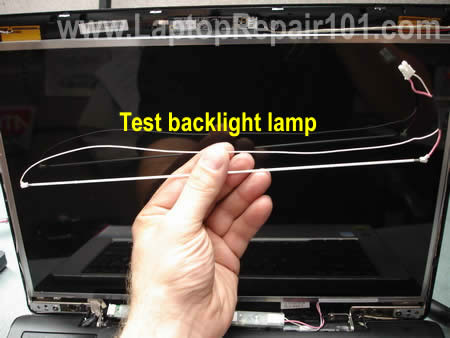
Either your inverter or the backlight has gone kaputz in the LCD. I doubt the LCD has bought the farm.

They look similar to the parts in the image below.

Inverter (will look similar to one of these and is a easy fix if you can follow the service manual for your particular laptop family)

laptop-screen-inverters.jpg


Backlight (is a thin, long glass tube filled that lights up that the LDC screen usually at the bottom of the LCD screen protected by a metal strip shaped like a U th)

test-screen-inverter-03.jpg


Order of repair ease:

Inverter (usually the LCD cover, a screw or two holding the inverter in place and the male wire connecters)
replacement LCD screen (LCD cover, 4 to 10 screws holding the screen/screen bars in place, screws holding inverter/male wire connectors)
...
...
backlight (you probably want someone who knows how to disassemble the LCD screen without damaging it)

=====

If you hook a monitor up to it, you have to use the Fn (function key) + Monitor Icon (one of the keys on the F1-12 row) to send the signal to an external device. Your bios may detect an external monitor and activate sending a signal if it's connected at boot up.
 
Top