
You are using an out of date browser. It may not display this or other websites correctly.
You should upgrade or use an alternative browser.
You should upgrade or use an alternative browser.
Essential Official Android Thread
More options
Who Replied?


http://www.androidauthority.com/iphone-5s-vs-lg-g2-271392/? Thats a 5.2" screen
LG’s latest flagship is the G2, a device that’s dominating benchmarks and winning acclaim for its industry leading 2.65mm thin bezel and latest-gen 5.2 inch 1080 IPS LCD display. iPhone 5S is the latest flagship from Apple and, for the most part, exhibits a near identical aesthetic and form factor to its predecessor, iPhone 5. Boasting the world’s first mobile 64-bit ARM processor, a more impressive camera, the same display as iPhone 5, and fingerprint reading tech, is it enough to satisfy consumers’ need for ever better mobile devices?
YouTube Comments Soon Won’t be so Terrible Thanks to Google+

Heres the article because I had no Idea what it was about rather than seeing names
http://www.droid-life.com/2013/09/24/youtube-comments-soon-wont-be-so-terrible-thanks-to-google/
This news isn’t necessarily Android-related, but YouTube is as big of a Google service as any, and we wanted to make sure you were aware. Comments on YouTube videos and in channel discussion tabs will no longer be quite as terrible thanks to the incorporation of Google+ comments. The discussion tab comment overhaul has already begun, but comments in actual video pages won’t rollout for some time, though you can see an example of what they will look like above.
Also, with new comments come new features. For example, as you browse through YouTube videos that have the new G+ comments, you’ll see the comments you “care about” move to the top. In other words, comments from popular personalities, friends in G+ circles, or the video’s creator will be easily seen rather than the trolling responses that fill up popular channels.. The rest of the new goodies can be found below:
- Comments you care about move to the top: You’ll see posts at the top of the list from the video’s creator, popular personalities, engaged discussions about the video, and people in your Google+ Circles.
- Join the conversation publicly or privately: You can choose to start a conversation so that it is seen by everyone on YouTube and Google+, only people in your Circles or just your bestie. Like Gmail, replies are threaded so you can easily follow conversations.
- Better ways to moderate comments: You have new tools to review comments before they’re posted, block certain words or save time by auto-approving comments from certain fans. These can help you spend less time moderating, and more time sharing videos and connecting with your fans.

I just want to know what Sprint phone to buy so i can start Ting !

That LG G2 hardware looks legit, hope the nexus 5 hardware is similar

Ubuntu Touch OS launching Oct. 17, ready for supported Android devices
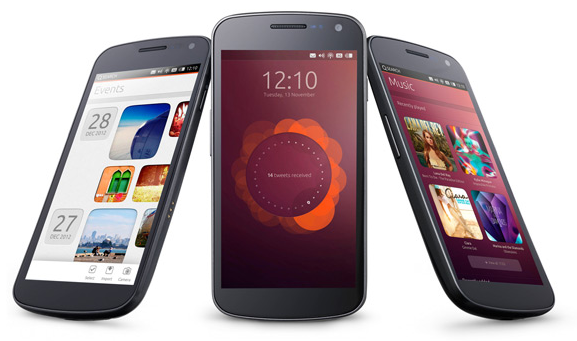
Don't nobody give a fukk about "Ubuntu Touch OS". I think most folks (including my self) are much more interested in "Ubuntu for Android". When is "Ubuntu for Android" supposed to come out?
They had plans for a dual boot phone android/ubuntu. Specs would've crushed the buildings but they didn't meet their fundraiser goal.Don't nobody give a fukk about "Ubuntu Touch OS". I think most folks (including my self) are much more interested in "Ubuntu for Android". When is "Ubuntu for Android" supposed to come out?
http://www.indiegogo.com/projects/ubuntu-edge

Samsung is gonna release a phone with a curved screen. Also launching a f series of phones. Made to be higher quality than the galaxy series. They will be made of better materials like aluminum instead of plastic. Sometime early next year.
http://www.geeky-gadgets.com/samsun...um-smartphones-in-the-works-rumor-25-09-2013/
They are also implementing a new camera sensor in their premium devices called ISOCELL which will improve mobile camera pics.
http://www.engadget.com/2013/09/23/samsung-isocell-smartphone-camera-sensor/
Galaxy s5 concept


http://m.intomobile.com/2013/09/24/...-includes-flexible-screen-fingerprint-sensor/
http://www.geeky-gadgets.com/samsun...um-smartphones-in-the-works-rumor-25-09-2013/
They are also implementing a new camera sensor in their premium devices called ISOCELL which will improve mobile camera pics.
http://www.engadget.com/2013/09/23/samsung-isocell-smartphone-camera-sensor/
Galaxy s5 concept
http://m.intomobile.com/2013/09/24/...-includes-flexible-screen-fingerprint-sensor/
Last edited:
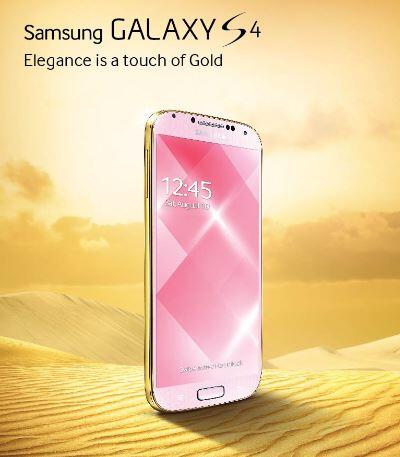

 wow they actually did straight bite apple on this one.
That shyt was a pipe dream lolThey had plans for a dual boot phone android/ubuntu. Specs would've crushed the buildings but they didn't meet their fundraiser goal.
http://www.indiegogo.com/projects/ubuntu-edge
Would've been dope thoughThat shyt was a pipe dream lol

They had plans for a dual boot phone android/ubuntu. Specs would've crushed the buildings but they didn't meet their fundraiser goal.
http://www.indiegogo.com/projects/ubuntu-edge
It looks like "Ubuntu for Android" is a separate thing from "Ubuntu Edge" & is still in development.

Hangouts 1.2 Update Rolling Out, Brings Availability Statuses, A Better Organized Contact List, And More

Google Hangouts features

Online status details are back!
This is by far the biggest feature we have all been begging for. Google Talk used to organize contacts by online status, putting online users on top and letting you know if they were available or not. This feature disappeared after Hangouts took over Talk, something many of us have been quite upset about.
Online status is back! You can now see who is reachable by going to new hangout window. Online users will be marked with a green Hangouts icon while offline users will carry a gray one.
I, for one, am very happy to see this feature coming back. It’s really hard to try to message friends and family without even knowing if they are online (or if they EVER sign on, for that matter).
Contact and Hangouts organization
Contacts are now a bit more organized. You will be able to see your contacts separated in three categories: People you Hangout with, Suggested People, and Other Contacts. It is also easier to find your Hangout invites, as they are placed above your other conversations.
If that wasn’t enough, you can also simplify your contact list. You can hide contacts! Just press and hold on your contact and you will be prompted to hide him/her.
[*]You can finally see who is on Hangouts! When you start a new Hangout, green icons show who's on, and gray shows who's not.
[*]Contacts are now organized by People you Hangout with, Suggested People, and Other Contacts.
[*]Long press contacts in the New Hangout screen to hide them.
[*]Invites are now above your conversations so they're easier to find.
[*]Pinch-to-zoom photos!
Google Hangouts features

Online status details are back!
This is by far the biggest feature we have all been begging for. Google Talk used to organize contacts by online status, putting online users on top and letting you know if they were available or not. This feature disappeared after Hangouts took over Talk, something many of us have been quite upset about.
Online status is back! You can now see who is reachable by going to new hangout window. Online users will be marked with a green Hangouts icon while offline users will carry a gray one.
I, for one, am very happy to see this feature coming back. It’s really hard to try to message friends and family without even knowing if they are online (or if they EVER sign on, for that matter).
Contact and Hangouts organization
Contacts are now a bit more organized. You will be able to see your contacts separated in three categories: People you Hangout with, Suggested People, and Other Contacts. It is also easier to find your Hangout invites, as they are placed above your other conversations.
If that wasn’t enough, you can also simplify your contact list. You can hide contacts! Just press and hold on your contact and you will be prompted to hide him/her.
Last edited: