Rohiggidy

The Big League
Joined
Jun 8, 2012
Messages
6,576
Reputation
80
Daps
2,433
Reppin
New York
How to turn on each gmail label notification. This control which label you want notifying you. Some are turned off by default. Click the tab on the mobile gmail app ex. Primary, social then go to the settings menu and then check the label notification. You can change the sync to all or 30 days.

photo.jpg
 

Rohiggidy

The Big League
Joined
Jun 8, 2012
Messages
6,576
Reputation
80
Daps
2,433
Reppin
New York
Multi-selecting emails in Gmail for Android

If you thought that the ability to multi-select emails went away with the latest version of Gmail for Android, think again. Tap those big letters/avatars on the left side and that's what it does.

13+-+1
 

diggy

Florida Man
Supporter
Joined
May 1, 2012
Messages
17,504
Reputation
4,657
Daps
45,038
app got revamped months ago :ufdup:

anyways there is nothing wrong with the nexus 4 camera....you have to manually adjust the setting. i said time and time again that switch the exposure to -1 in sunny conditions and hold down the shutter button until it reach the 12 oclock position :snoop:

Sometimes its finicky for me with what Im doing, especially if Im out fishing and need to take pics real quick. Sometimes I'll have the pic come out blury. Im not saying its not user error, but I need something I can just click and not worry about in those conditions. Ill try what you said tho.

I have only had this phone 2 months and added those programs to the evo maybe 2 months before I got the Nexus, so saying the programs were updated is moot, the phone just was too slow for it IMO, Im sure the apps are fine. Burst mode used to have the phone locked up quick.
 

Rohiggidy

The Big League
Joined
Jun 8, 2012
Messages
6,576
Reputation
80
Daps
2,433
Reppin
New York
Don't hit your cap: A few tweaks to cut down on Google Play Music data usage

google-play-music-settings_0.jpg


'All Access' doesn't have to mean 'all of your data cap'

Google Play Music is a pretty great service, especially when you have chosen to give up $9.99 per month for the new "All Access" subscription service. Without any thought of what music I own, what device I'm on or what I've loaded on my device, I just opened up Google Play Music and listened to the new "Random Access Memories" album by Daft Punk. Within seconds it started streaming in continuous high quality and I got to enjoy the entire album without a second thought.

But there's one small issue -- streaming that album just cost me over 290MB towards my monthly data cap.

In its attempt to make a seamless streaming experience for users, Google has somewhat obscured and selected the settings that make the user experience in Google Play Music as great as possible by default. This is certainly the right choice on average -- users don't want to spend their time tweaking settings, they just want to listen to their music anywhere and any way. But for those who are going to utilize Play Music daily and for hours at a time, there are settings that can be tweaked to make sure you're not unnecessarily using mobile data.

So what can you do to limit the amount of data usage from Play Music? Stick with us after the break and learn a few tips to keep from using up your monthly data cap with just streaming music.


Don't force high quality streaming

Google has made the right choice here by not choosing to force high quality streaming by default in Play Music. The more questionable choice however is to subtly change what this setting does when selected. By default, Play Music will now select the quality of music that is appropriate for the speed of your connection in order to keep the music flowing even if your connection is slow. This also means that there's no way to force the app to keep a lower quality music stream to cut down on data usage. This is really unfortunate as other apps offer this option, but you can do yourself a data usage favor here by keeping the "Stream at highest quality only" setting un-checked and let the app dynamically choose a bit rate for you.

This won't save you data when you're on a fast connection (it will always bump up to the highest quality when possible), but it can shave a few megabytes when your connection gets slower and the quality drops to keep continuous playback.

To cache or not to cache?

One of the less-understood features of Google Play Music is its local caching of music for offline listening. Adding to the simplicity of a streaming service, Play Music will automatically cache music that you listen to often on your device to cut back on data usage when you go back to the same song again. By default, the app will cache as it streams, meaning that it is downloading the entire song for offline use as soon as you hit "play" on any song in the app. In nearly every case this is the best choice, as the data usage is no higher than streaming in high quality, but will cut down usage to zero when listening again. If you truly will never listen to the song again, or are simply browsing through songs and not listening to them in their entirety, uncheck the "Cache during playback" option in the settings.

If you leave the option checked to cache while streaming and browse a lot of new music, you can always clear the cached songs in the settings if you need to free up space on your device.

Take advantage of pinning

Similarly to caching, using Google Play Music's option to "pin" music to your device is a great way to save on data usage. Pinning is simply on-demand caching of specific albums for offline access. You can pin items that are part of your own uploaded collection, as well as anything you find in the store as part of your All Access subscription. Pinned items will download in the background as soon as you hit the pin icon found in the album view of the app, and will only download via Wifi by default. While Google's default caching does a good job of keeping your most listened-to music available for offline access, it's nice to know you can force a download at any time when you know you'll be without a consistent connection for streaming.

The only downside of this is that on-demand pinned music doesn't seem to download very quickly. We have to assume this is for battery life concerns because Play Music is meant to do this seamlessly in the background, but it gets downright annoying when you're trying to pin an album 15 minutes before your flight takes off. You'll also need to know that Play Music will not store pinned music onto an external SDcard, something to keep in mind if you're tight on internal storage.

Wait for Wifi to download

While it isn't exactly Google's intended purpose, you can use Play Music with streaming entirely disabled if you prefer. The synced playlists and All Access options are still great to have even when you don't stream over mobile data, and with a few settings you can make it work in this situation. The two easiest settings to accomplish this are "Download via Wi-Fi only" and "Stream via Wi-Fi only", which will pretty much lock down any Play Music data access unless the device is on Wifi. Additionally, using the drop-down menu from the top of the interface -- such as "Listen Now" or "My Library" -- you can manually select "On device" music, as to know for certain that what you're playing is already downloaded to the device.

Google Play Music

With just a few quick tweaks, you'll be well on your way to cutting down on Google Play Music data usage while still enjoying the perks of a streaming music service with limitless listening possibilities. We all anxiously await the day where mobile broadband is ubiquitous and unlimited, but for now we have to realize the limitations and work around them. Keep these things in mind and you may just lessen your chance for a shocking data bill at the end of the month.

 

Rohiggidy

The Big League
Joined
Jun 8, 2012
Messages
6,576
Reputation
80
Daps
2,433
Reppin
New York
Sometimes its finicky for me with what Im doing, especially if Im out fishing and need to take pics real quick. Sometimes I'll have the pic come out blury. Im not saying its not user error, but I need something I can just click and not worry about in those conditions. Ill try what you said tho.

I have only had this phone 2 months and added those programs to the evo maybe 2 months before I got the Nexus, so saying the programs were updated is moot, the phone just was too slow for it IMO, Im sure the apps are fine. Burst mode used to have the phone locked up quick.

you have to tap the screen to focus on the image. No camera phone is point and shoot without first focusing on the image. The phone dont have optical zooom. Tap the screen first then hold down the camera button and see if your pic quality dont improve
 

Rohiggidy

The Big League
Joined
Jun 8, 2012
Messages
6,576
Reputation
80
Daps
2,433
Reppin
New York
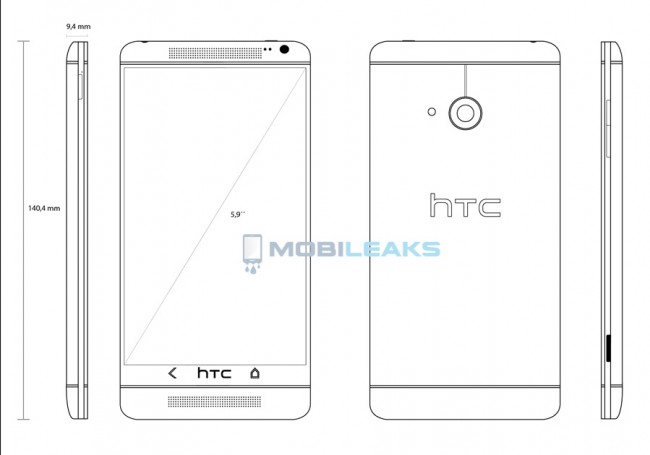
HTC T6 aka “One Max” to Launch Q3, Boasts 5.9″ 1080p Display and Snapdragon 800 CPU


HTC-T6-Blueprint-650x455.jpg
 

Rohiggidy

The Big League
Joined
Jun 8, 2012
Messages
6,576
Reputation
80
Daps
2,433
Reppin
New York
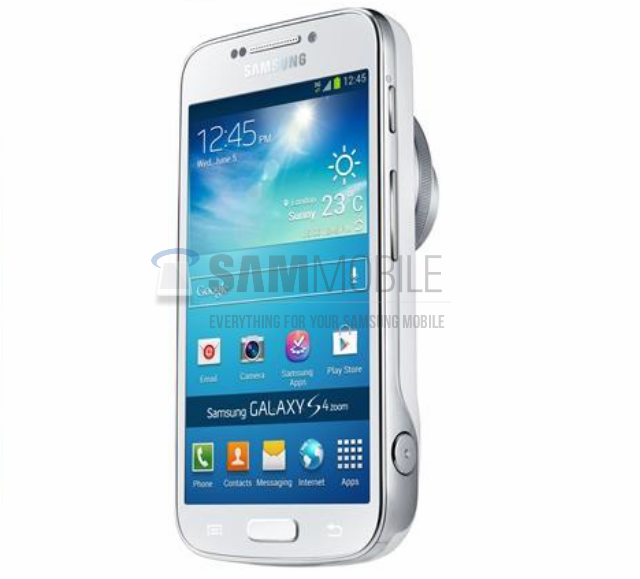
Samsung Galaxy S4 Zoom


Galaxy-S4-Zoom.png


nexusae0_Schermafbeelding-2013-06-08-om-02.09.33.png


The Galaxy S4 Zoom uses a 4.3” qHD sAMOLED display a 1.6GHz dual-core processor, 16 megapixel camera sensor with optical zoom, 8 GB intern with extern micro SD up to 64 GB, Bleutooth 4.0 LE Wi-Fi 802.11 a/b/g/n, and A-GPS. You are able to call with the Galaxy S4 Zoom, Samsung added a shutter button to the the device and the volume rockers or zoom buttons are on the right side. The Galaxy S4 Zoom runs on Samsung’s own Touch-Wiz Nature UX interface with Android 4.2.2 Jelly Bean on it.
 

Rohiggidy

The Big League
Joined
Jun 8, 2012
Messages
6,576
Reputation
80
Daps
2,433
Reppin
New York
The Google Keyboard For Android Supports Text Expansion, Here's How To Use It

nexusae0_Screenshot_2013-06-06-18-02-29_thumb.png


Here's how to set up text expansions:
Go to Settings -> Language & input -> tap on the settings icon for Google Keyboard. Keep in mind, if your phone has an OEM skin, things might be named differently or a little out of place.
--OR--
With the Google Keyboard already open on your screen, long-press the microphone button for the settings icon, then tap on Google Keyboard Settings.
Tap on Personal dictionary
Tap the '+' icon in the top right
Enter a long phrase and your shortcut text. Try using "AndroidPolice.com" and "ap"
If you have multiple languages set up, you may want to change the language dropdown to target all languages.
Hit the back button
 

Rohiggidy

The Big League
Joined
Jun 8, 2012
Messages
6,576
Reputation
80
Daps
2,433
Reppin
New York
Sometimes its finicky for me with what Im doing, especially if Im out fishing and need to take pics real quick. Sometimes I'll have the pic come out blury. Im not saying its not user error, but I need something I can just click and not worry about in those conditions. Ill try what you said tho.

I have only had this phone 2 months and added those programs to the evo maybe 2 months before I got the Nexus, so saying the programs were updated is moot, the phone just was too slow for it IMO, Im sure the apps are fine. Burst mode used to have the phone locked up quick.

[ame=http://youtu.be/yK4XUmDU_Rk]Samsung Galaxy Note 2 Camera Zoom FX - YouTube[/ame]
 

dontreadthis

philly.
Joined
May 6, 2012
Messages
11,730
Reputation
2,354
Daps
47,589
any suggestions on how to not have every single album art on my phone pop up in the gallery when I just want to see pictures/videos?
 

Rain

👀
Staff member
Supporter
Joined
Apr 30, 2012
Messages
33,384
Reputation
5,737
Daps
106,594
i like it and its free. but swiftkey is still the best for my style of sloppy speed texting

Same for me. Sticking with Google's keyboard since it doesn't lag on me though. They should add in auto-correct for when you're typing in a search bar like swiftkey does.
 

Wayans Brehs

All Star
Supporter
Joined
May 5, 2012
Messages
1,978
Reputation
200
Daps
4,975
fukk group messaging on any android device. shyts so frustrating dealing with iMessage group messages, getting individual texts from each person rather than a chat room itself. How do y'all nikkas deal with it

what phone do you have? this annoyed me to no end when I had my G2x... but with my N4 I finally receive and send group messages within a chat thread. Not sure if it was something that was implemented in newer android phones or android versions or what...
 

Conz

Superstar
Joined
May 12, 2012
Messages
9,250
Reputation
850
Daps
20,133
so what's the top android right now? im getting a new phone in July, been on the Incredible 2 for 2 years and never had a problem with it. Galaxy? I refuse to switch to Apple.
 
Top